Short answer
If you mostly study alone on a Mac and want notes, PDF markup and flashcards in one place, Folio is the simpler fit: a native Mac app, €5 once, no account, and it works offline. If you collaborate a lot, need Windows or a phone, or enjoy building databases, stay with Notion.
Why students look for a Notion alternative
Notion is a flexible workspace: pages, databases, templates and sharing, all in the cloud. That flexibility is exactly why so many study setups start there. It is also why some of them stall. These are the usual friction points for students:
- Setup before study. A blank workspace asks you to design a system first: databases for courses, properties for due dates, templates for lectures. It is easy to spend the evening organising instead of revising.
- Studying happens in other apps. Notion has toggles and callouts, but no built-in spaced repetition. Flashcards end up in Anki or Quizlet, and the reviewing lives somewhere else entirely.
- PDFs are shown, not marked up. You can embed lecture slides in a Notion page, but there are no tools there to highlight or draw on them, so the PDF goes back to Preview.
- It is built around the cloud. You need an account, and while Notion can keep selected pages available offline, it is designed to be online and synced.
None of this makes Notion bad. It means Notion is a general workspace, and studying is one of many things it can be bent into.
What a study app on the Mac should do
Before comparing tools, it helps to name the job. For most high-school and university students it looks like this:
- Capture lecture notes quickly, with structure you don't have to design.
- Read and mark up the PDFs your teachers hand out.
- Turn that material into active recall: questions you answer, not text you reread.
- Bring things back right before you forget them, so revision is spread across the term.
- Keep your notes yours: stored locally, exportable, affordable.
How Folio approaches it
Folio is a native macOS app built for exactly that loop. It is opinionated on purpose: instead of a blank canvas, you get notebooks, pages and study tools that already work together.
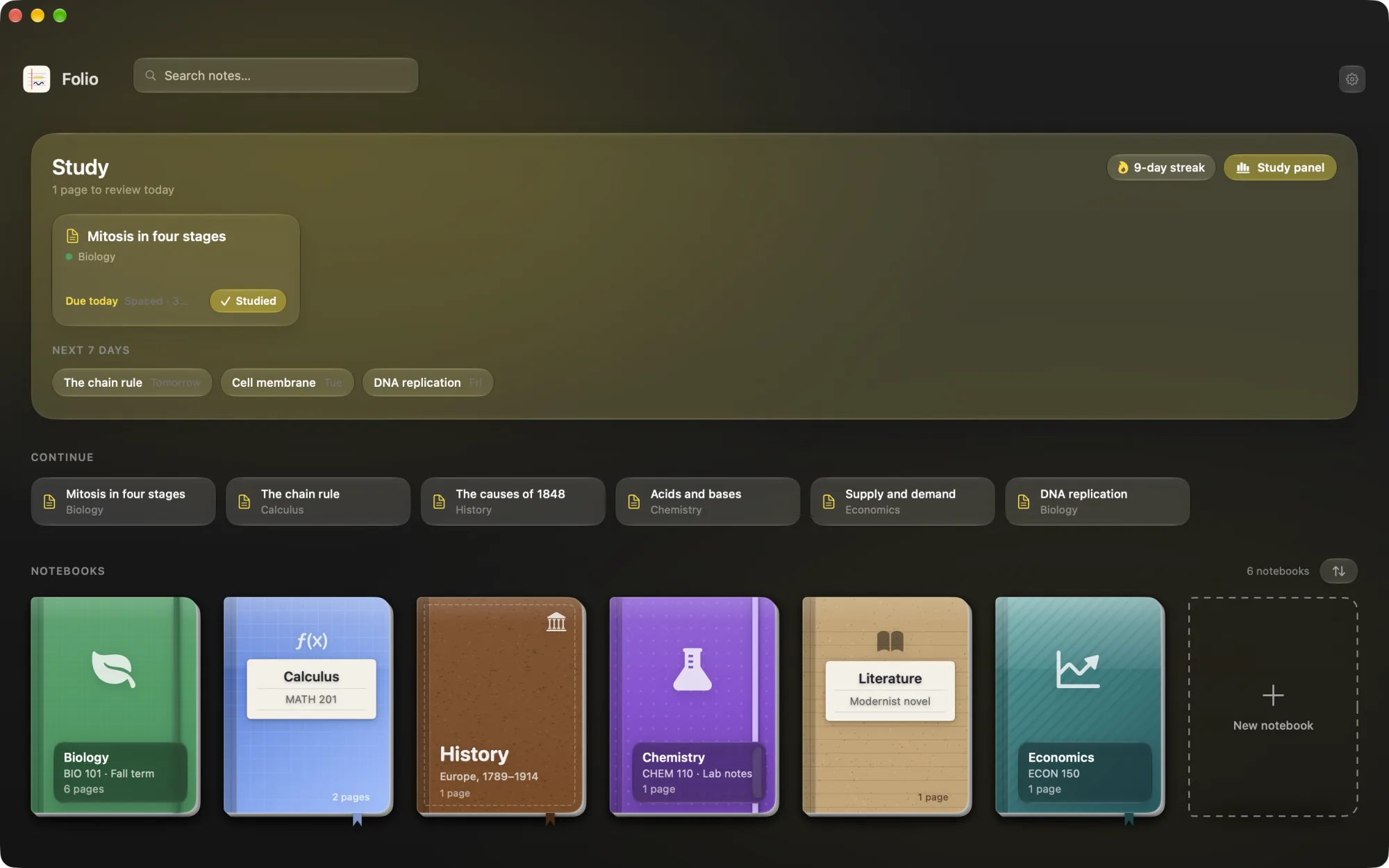
A shelf of notebooks instead of a blank database
Every subject gets a notebook with its own cover on a bookshelf. Inside, you have pages, loose pages when something doesn't belong anywhere yet, and nested subpages for chapters and topics. There is nothing to configure before you start writing.
Pages that feel like paper
Pages are rich text on lined, grid, dotted or plain paper. You can underline in highlighter colours, add images, record audio during a lecture, and type / for headings, checklists, code, post-its and arrows. Any page exports to PDF when you need to hand something in.
PDFs you can actually mark up
Drop in lecture slides or a textbook chapter as a full page, or attach a PDF to your own notes. Highlight, add post-its and draw. The annotations are saved inside the PDF file itself, so it opens marked up in any other PDF reader too. Our guide on how to annotate a PDF on Mac covers this step by step.
Flashcards and reviews built in
Pick a page or a PDF and Folio drafts flashcards from it with AI, on your Mac through Apple Intelligence where available. Every card is scheduled with FSRS, a modern spaced repetition algorithm, and due cards show up on the shelf. Quizzes, exams, study tasks, streaks, a study heatmap and calendar integration sit alongside. The spaced repetition guide explains how the scheduling works.
Lio, a study buddy who has read your notes
Lio is Folio's mascot and study assistant. Ask about a page or a whole notebook and Lio answers from what you wrote. It runs on Apple Intelligence on your Mac, free Gemini, or a local Ollama model, so there is no paid AI plan to add.
Try Folio free for 24 hours
Every feature, no account, no card. If it fits the way you study, it's €5 once. No subscription.
macOS 26 Tahoe or later. First launch: right-click Folio in Applications and choose Open.
Notion vs Folio for studying
| Notion | Folio | |
|---|---|---|
| What it is | All-in-one workspace: docs, wikis, databases | Native Mac app for notes and studying |
| Price | Free plan; paid plans billed monthly or yearly | €5 one-time, after a 24-hour free trial |
| Account | Required | None |
| Offline | Selected pages; designed around sync | Everything, always |
| Devices | Web, Mac, Windows, iPhone, iPad, Android | Mac only (macOS 26 Tahoe) |
| PDF annotation | Embeds PDFs, no markup tools | Highlights, post-its, drawing, saved in the PDF |
| Spaced repetition | Not built in | Built in, scheduled with FSRS |
| Collaboration | Real-time editing, comments, sharing | None: it's a personal app |
| Databases | A core strength | No: notebooks, pages and subpages |
| AI | Notion AI, tied to paid plans | On-device Apple Intelligence; Lio also works with free Gemini or Ollama |
When Notion is still the better choice
We would rather you pick the right tool than the wrong one twice. Stay with Notion, or pair it with something else, if:
- Most of your work is shared: group projects, society wikis, class notes edited together.
- You study on Windows, Android or your phone as much as on your Mac.
- You rely on databases: reading lists, assignment trackers, linked views.
- Your Mac can't run macOS 26 Tahoe.
And if you write by hand on an iPad with Apple Pencil, a handwriting app such as GoodNotes or Notability will suit you better than either.
Moving from Notion to Folio
You don't have to migrate everything. Start with this term:
- Install the trial. Download Folio, drag it to Applications, then right-click it and choose Open the first time (it is not notarized by Apple yet).
- Make one notebook per subject. Pick a cover; it takes seconds.
- Bring what you are studying now. Export the relevant Notion pages as PDF and import them into the notebook, or paste text into a new page.
- Mark up and make cards. Highlight the key ideas, then generate flashcards from the page or PDF.
- Review what's due. A few minutes a day on the shelf's study section does more than a long session the night before.
Your notes stay portable: Folio exports everything to Markdown or JSON whenever you like.
See if Folio fits your term
24 hours with every feature, free. Then €5 once, yours for good, with free updates.